Reference documentation about DAIC infrastructure:
- Hardware - Partitions, GPUs, nodes
- Storage - Storage locations
- Software - Modules and containers
- Policies - Usage guidelines and user agreement
- About DAIC - Contributors and citation
This is the multi-page printable view of this section. Click here to print.
Reference documentation about DAIC infrastructure:
Use one of the DAIC login hosts when connecting over SSH. The table below lists the available login hosts and their hardware characteristics.
daic01.hpc.tudelft.nl or daic02.hpc.tudelft.nl. For the full first-login procedure, see First Login.| Hostname | CPU (Sockets x Model) | Cores per Socket | Total Cores | Total RAM (GiB) | Local Disk (/tmp, GiB) | GPU Type | GPU Count |
|---|---|---|---|---|---|---|---|
| daic01 | 2 x AMD EPYC 7413 24-Core Processor | 24 | 48 | 503 | 402 | NVIDIA A40 | 1 |
| daic02 | 1 x AMD EPYC 9115 16-Core Processor | 16 | 16 | 62 | 841 | NVIDIA L40S | 1 |
Current inventory totals for the nodes listed on this page:
| Hostname | CPU (Sockets x Model) | Cores per Socket | Total Cores | Total RAM (GiB) | Local Disk (/tmp, GiB) | GPU Type | GPU Count | Slurm Partition |
|---|---|---|---|---|---|---|---|---|
| gpu12 | 2 x AMD EPYC 7413 24-Core Processor | 24 | 48 | 503 | 402 | NVIDIA A40 | 3 | all;ewi-st |
| gpu23 | 2 x AMD EPYC 7543 32-Core Processor | 32 | 64 | 1007 | 842 | NVIDIA A40 | 3 | all;ewi-insy |
| gpu24 | 2 x AMD EPYC 7543 32-Core Processor | 32 | 64 | 1007 | 842 | NVIDIA A40 | 3 | all;ewi-insy |
| gpu29 | 2 x AMD EPYC 7543 32-Core Processor | 32 | 64 | 503 | 842 | NVIDIA A40 | 3 | all;me-cor |
| gpu30 | 1 x AMD EPYC 9534 64-Core Processor | 64 | 64 | 755 | 842 | NVIDIA L40 | 3 | all;ewi-insy |
| gpu31 | 1 x AMD EPYC 9534 64-Core Processor | 64 | 64 | 755 | 842 | NVIDIA L40 | 3 | all;ewi-insy |
| gpu36 | 2 x Intel(R) Xeon(R) 6724P | 16 | 32 | 504 | 1741 | NVIDIA RTX PRO 6000 Blackwell Server Edition | 2 | all;ewi-insy |
| gpu37 | 2 x Intel(R) Xeon(R) 6724P | 16 | 32 | 504 | 1741 | NVIDIA RTX PRO 6000 Blackwell Server Edition | 2 | all;ewi-insy |
| gpu38 | 2 x Intel(R) Xeon(R) 6724P | 16 | 32 | 504 | 1741 | NVIDIA RTX PRO 6000 Blackwell Server Edition | 2 | all;ewi-me |
| gpu39 | 2 x Intel(R) Xeon(R) 6724P | 16 | 32 | 504 | 1741 | NVIDIA RTX PRO 6000 Blackwell Server Edition | 2 | all;ewi-me |
| gpu40 | 2 x Intel(R) Xeon(R) 6724P | 16 | 32 | 504 | 1741 | NVIDIA RTX PRO 6000 Blackwell Server Edition | 2 | all;ewi-me |
| gpu41 | 2 x Intel(R) Xeon(R) 6724P | 16 | 32 | 504 | 1741 | NVIDIA RTX PRO 6000 Blackwell Server Edition | 2 | all;ewi-me |
| gpu42 | 2 x Intel(R) Xeon(R) 6724P | 16 | 32 | 504 | 1741 | NVIDIA RTX PRO 6000 Blackwell Server Edition | 2 | all;ewi-me |
| gpu43 | 2 x Intel(R) Xeon(R) 6724P | 16 | 32 | 504 | 1741 | NVIDIA RTX PRO 6000 Blackwell Server Edition | 2 | all;ewi-me |
| gpu44 | 2 x Intel(R) Xeon(R) 6724P | 16 | 32 | 504 | 1741 | NVIDIA RTX PRO 6000 Blackwell Server Edition | 2 | all;ewi-me |
| gpu45 | 2 x Intel(R) Xeon(R) 6724P | 16 | 32 | 504 | 1741 | NVIDIA RTX PRO 6000 Blackwell Server Edition | 2 | all;ewi-me |
| gpu46 | 2 x Intel(R) Xeon(R) 6724P | 16 | 32 | 504 | 1741 | NVIDIA RTX PRO 6000 Blackwell Server Edition | 2 | all;ewi-st |
| gpu47 | 2 x Intel(R) Xeon(R) 6724P | 16 | 32 | 504 | 1741 | NVIDIA RTX PRO 6000 Blackwell Server Edition | 2 | all;ewi-st |
| gpu48 | 2 x Intel(R) Xeon(R) 6724P | 16 | 32 | 504 | 1741 | NVIDIA RTX PRO 6000 Blackwell Server Edition | 2 | all;ewi-st |
| gpu49 | 2 x Intel(R) Xeon(R) 6724P | 16 | 32 | 504 | 1741 | NVIDIA RTX PRO 6000 Blackwell Server Edition | 2 | all;ewi-st |
| gpu50 | 2 x Intel(R) Xeon(R) 6724P | 16 | 32 | 504 | 1741 | NVIDIA RTX PRO 6000 Blackwell Server Edition | 2 | all;ewi-st |
| gpu51 | 2 x Intel(R) Xeon(R) 6724P | 16 | 32 | 504 | 1741 | NVIDIA RTX PRO 6000 Blackwell Server Edition | 2 | all;ewi-st |
| gpu52 | 2 x Intel(R) Xeon(R) 6724P | 16 | 32 | 504 | 1741 | NVIDIA RTX PRO 6000 Blackwell Server Edition | 2 | all;ewi-st |
| gpu53 | 2 x Intel(R) Xeon(R) 6724P | 16 | 32 | 504 | 1741 | NVIDIA RTX PRO 6000 Blackwell Server Edition | 2 | all;me-cor |
| Partition | Access | Description |
|---|---|---|
all | All users | Default partition, access to all GPU nodes |
test | All users | Testing partition (CPU only) |
ewi-insy | EWI-INSY | Reserved for INSY department |
ewi-me | EWI-ME | Reserved for ME department |
ewi-st | EWI-ST | Reserved for ST department |
me-cor | ME-COR | Reserved for COR group |
| GPU Type | Memory | Nodes | GPUs per node | Slurm GPU name |
|---|---|---|---|---|
| NVIDIA A40 | 48 GB | 4 | 3 | nvidia_a40 |
| NVIDIA L40 | 48 GB | 2 | 3 | nvidia_l40 |
| NVIDIA RTX Pro 6000 | 96 GB | 10 | 2 | nvidia_rtx_pro_6000 |
--gres=gpu:<slurm-gpu-name>:<count>). Otherwise, do not specify a GPU type to allow the scheduler to choose the most appropriate one instead.| Component | Value |
|---|---|
| Scheduler | Slurm 25.05 |
| Default partition | all |
| QoS | normal |
Jobs are submitted using sbatch for batch jobs or salloc for interactive sessions.
sbatch job.sh          # Submit batch job
salloc --partition=all # Start interactive session
All jobs require an account:
#SBATCH --account=<your-account>
Find your account with:
sacctmgr show user $USER withassoc format=account%20
DAIC uses Lmod to manage software environments. Modules allow you to load specific versions of software without conflicts.
DAIC organizes modules in a hierarchy. First load a base module to access software:
| Base module | Purpose |
|---|---|
2025/cpu | CPU-only software (default) |
2025/gpu | GPU software (CUDA, PyTorch, etc.) |
module load 2025/gpu
After loading a base module, additional software becomes available.
| Command | Description |
|---|---|
module load <name> | Load a module |
module unload <name> | Unload a module |
module swap <old> <new> | Replace one module with another |
module purge | Unload all modules |
module refresh | Reload aliases from current modules |
module update | Reload all currently loaded modules |
| Command | Description |
|---|---|
module list | Show loaded modules |
module avail | List available modules |
module avail <string> | List modules containing string |
module spider <name> | Search all possible modules |
module spider <name>/<version> | Detailed info about specific version |
module whatis <name> | Print module description |
module keyword <string> | Search names and descriptions |
module show <name> | Show commands in module file |
| Command | Description |
|---|---|
module save <name> | Save current modules to collection |
module restore <name> | Restore modules from collection |
module savelist | List saved collections |
module describe <name> | Show contents of collection |
module disable <name> | Remove a collection |
| Command | Description |
|---|---|
module is-loaded <name> | Check if module is loaded (for scripts) |
module is-avail <name> | Check if module can be loaded |
ml | Shorthand for module list |
ml <name> | Shorthand for module load <name> |
List all available modules:
module avail
Search for a specific module:
module spider pytorch
Get details about a module:
module spider py-torch/2.5.1
module spider makes Lmod write a module list cache of about 5 MB to ~/.cache/lmod, which on its own exceeds the 5 MB quota of the cluster home. The .daicrc file prevents this by setting LMOD_SHORT_TIME. If it already happened, remove the cache with rm -r ~/.cache/lmod.Load a single module:
module load cuda/12.9
Load multiple modules:
module load 2025/gpu cuda/12.9 py-torch/2.5.1
Check loaded modules:
module list
To use PyTorch with GPU support:
module load 2025/gpu
module load py-torch/2.5.1
python -c "import torch; print(torch.cuda.is_available())"
> True
After loading 2025/gpu, the following software is available (partial list):
| Category | Modules |
|---|---|
| Deep learning | py-torch/2.5.1, py-torch-geometric/2.5.3 |
| GPU | cuda/12.9, cudnn/8.9.7.29-12 |
| Scientific | py-numpy/1.26.4, py-scipy/1.14.1, py-pandas/2.2.3 |
| ML | py-scikit-learn/1.5.2 |
| Compilers | cuda/12.9, intel/oneapi_2025.3 |
| Applications | matlab/R2025b |
Use module avail to see the full list.
Load modules in your SLURM batch script:
#!/bin/bash
#SBATCH --account=<your-account>
#SBATCH --partition=all
#SBATCH --gres=gpu:nvidia_l40:1

module purge
module load 2025/gpu
module load py-torch/2.5.1

srun python train.py
py-torch modules contain GPU code for the A40 and L40 only. On an RTX Pro 6000 node torch.cuda.is_available() still returns True, but the first GPU operation fails with CUDA error: no kernel image is available for execution on the device. Request an A40 (gpu:nvidia_a40:1) or L40 (gpu:nvidia_l40:1) for jobs that use these modules.module purge to ensure a clean environment.Save frequently used module combinations:
module load 2025/gpu py-torch/2.5.1 py-numpy/1.26.4
module save my-pytorch
Restore later:
module restore my-pytorch
List saved collections:
module savelist
DAIC provides access to multiple storage areas. Understanding their purposes and limitations is essential for effective work on the cluster.
| Storage | Location | Quota | Purpose | Backup |
|---|---|---|---|---|
| Cluster home | /home/<NetID> | ~5 MB | Config files only | No |
| Linux home | ~/linuxhome | ~30 GB | Personal files | Yes |
| Project | /tudelft.net/staff-umbrella/<project> | By request | Research data | Yes |
| Group (legacy) | /tudelft.net/staff-groups/<faculty>/<dept>/<group> | Fair use | Shared files | Yes |
| Bulk (legacy) | /tudelft.net/staff-bulk/<faculty>/<dept>/<group> | Fair use | Large datasets | Yes |
| Local temp | /tmp/<NetID> | None | Temporary files | No |
Your cluster home (/home/<NetID>) has a very small quota of approximately 5 MB. This is intentionally limited and meant only for:
.bashrc, .bash_profile).ssh/)Check your cluster home quota:
quota -s
Disk quotas for user <NetID> (uid XXXXXX):
     Filesystem   space   quota   limit   grace   files   quota   limit   grace
control:/trinity/home
                   528K   4096K   5120K              21    4096    5120
The filesystem names in the output are NFS export names, not mount paths. control:/trinity/home is your cluster home: /home is a symlink to /trinity/home, so /home/<NetID> and /trinity/home/<NetID> are the same directory. Your Linux home appears as svm<N>.tudhpc.storage.tudelft.net:/staff_homes_linux/<initial>/<NetID>; ~/linuxhome is a symlink to its mount point /tudelft.net/staff-homes-linux/<initial>/<NetID>. An asterisk after the space value (5120K*) means you are over quota.
Many tools write caches to hidden directories in your home without asking. The .daicrc file sets environment variables that redirect the caches of pip, uv, conda, Apptainer, Hugging Face, the NVIDIA CUDA compute cache, and other XDG-aware tools to ~/linuxhome. Install it before running GPU jobs: the CUDA compute cache (~/.nv/ComputeCache) alone grows to several megabytes and exceeds the quota.
If your home is already full, find what is using space and move it, leaving a symlink so tools that hardcode the path keep working:
du -ak ~ | sort -rn | head -20
mv ~/.nv ~/linuxhome/.nv && ln -s linuxhome/.nv ~/.nv
On first login, symlinks are created in your home directory pointing to TU Delft network storage:
TU Delft network storage requires a valid Kerberos ticket. Without it, you will get “Permission denied” or “Stale file handle” errors when accessing linuxhome, windowshome, project, group, or bulk storage.
When logging in via SSH with a password, a Kerberos ticket is created automatically.
When logging in via SSH with a public key or through OpenOndemand, you must manually obtain a ticket:
kinit
Enter your NetID password when prompted.
Check your current ticket status:
klist
Example output with a valid ticket:
Ticket cache: KCM:656519
Default principal: <NetID>@TUDELFT.NET

Valid starting     Expires            Service principal
03/23/26 11:05:12  03/23/26 21:05:12  krbtgt/TUDELFT.NET@TUDELFT.NET
        renew until 03/30/26 12:05:03
~/linuxhome - Your Linux home on TU Delft storage.These are accessible from DAIC, your TU Delft workstation, and via webdata.
~/windowshome is Your Windows home on TU Delft storage. It may or may not be accessible from DAIC depending on your department’s configuration.Project storage is for research data accessible only to project members. Request project storage via the Self-Service Portal.
Access path: /tudelft.net/staff-umbrella/<project-name>
staff-umbrella) for new data.Group storage is shared with your department or group. Not suitable for confidential data.
Access paths:
/tudelft.net/staff-groups/<faculty>/<department>/<group>/tudelft.net/staff-bulk/<faculty>/<department>/<group>Each compute node has local /tmp storage for temporary files during job execution.
Use local storage for intermediate files that do not need to persist after job completion.
Check usage of a directory:
du -hs /tudelft.net/staff-umbrella/<project>
37G     /tudelft.net/staff-umbrella/<project>
Check available space:
df -h /tudelft.net/staff-umbrella/<project>
Filesystem      Size  Used Avail Use% Mounted on
...             1.0T   38G  987G   4% /tudelft.net/staff-umbrella/<project>
There are several ways to transfer data to and from DAIC:
| Method | Best for | Notes |
|---|---|---|
rclone | Cloud storage, large transfers | Supports many backends |
rsync | Large directories, incremental sync | Efficient for updates |
scp | Individual files | Simple one-time transfers |
| SFTP | Direct transfer to staff-umbrella | Use webdata or SFTP client |
Rclone supports transfers to/from many cloud providers and remote systems. Run rclone on your local machine to transfer data to DAIC.
Install rclone locally:
See rclone install guide for your operating system.
Configure DAIC as an SFTP remote (one-time setup):
rclone config
# Choose: n (new remote)
# Name: daic
# Type: sftp
# Host: daic01.hpc.tudelft.nl
# User: <NetID>
# Use SSH key authentication
Copy from local to DAIC:
rclone copy /local/data/ daic:/tudelft.net/staff-umbrella/<project>/
Sync local directory to DAIC:
rclone sync /local/data/ daic:/tudelft.net/staff-umbrella/<project>/data/
See rclone documentation for more options and cloud backends.
Clone repositories directly on DAIC:
git clone git@gitlab.tudelft.nl:your-group/your-repo.git
Rsync is efficient for transferring large directories and synchronizing changes.
From local to DAIC:
rsync -avz --progress /local/path/ <NetID>@daic01.hpc.tudelft.nl:/tudelft.net/staff-umbrella/<project>/
From DAIC to local:
rsync -avz --progress <NetID>@daic01.hpc.tudelft.nl:/tudelft.net/staff-umbrella/<project>/ /local/path/
Common options:
-a archive mode (preserves permissions, timestamps)-v verbose output-z compress during transfer--progress show transfer progress--dry-run test without transferringFor simple one-time file transfers:
Copy file to DAIC:
scp /local/file.tar.gz <NetID>@daic01.hpc.tudelft.nl:/tudelft.net/staff-umbrella/<project>/
Copy file from DAIC:
scp <NetID>@daic01.hpc.tudelft.nl:/tudelft.net/staff-umbrella/<project>/file.tar.gz /local/path/
Copy directory:
scp -r /local/directory/ <NetID>@daic01.hpc.tudelft.nl:/tudelft.net/staff-umbrella/<project>/
You can transfer data directly to project storage without going through DAIC.
Connect to sftp.tudelft.nl with your NetID credentials using the command line or clients like FileZilla, WinSCP, or Cyberduck.
Host: sftp.tudelft.nl
Username: <NetID>
Port: 22
Command line example:
sftp sftp.tudelft.nl
sftp> cd staff-umbrella/<project>
sftp> put localfile.txt
sftp> get remotefile.txt
sftp> put -r localfolder/
sftp> get -r remotefolder/
sftp> bye
Navigate to /staff-umbrella/<project>/ to access your project storage.
The usage dashboard at dashboard.daic.tudelft.nl shows how DAIC has been used over time, based on the SLURM accounting database. Log in with your TU Delft account.
The dashboard reports allocated resources: CPUs, GPUs, and memory that SLURM reserved for jobs, multiplied by the time the jobs ran. Allocation is not measured hardware load - a job that reserves 8 cores and uses one still counts as 8 allocated cores. The exception is the Efficiency section, which compares consumed resources with allocated ones where SLURM records them (consumed core-time and peak memory; GPU usage is not recorded by SLURM accounting).
All charts are computed for the date range selected in the sidebar. Filters for partition, account, QoS, and job state narrow every chart; the “Color By” selector splits the charts by that dimension.
| Section | Content |
|---|---|
| Users, Jobs | Active users and submitted jobs per period |
| CPU / GPU / Memory Usage | Allocated resource-hours per period and their distribution |
| Efficiency | Consumed over allocated resources per period. Memory efficiency is weighted by job runtime and based on peak usage, so it is an upper bound |
| Usage by Node | Resource-hours per node. With “Normalize %” enabled, the percentage of each node’s capacity, plus cluster-wide allocation gauges |
| Timing | Waiting times and job durations: trends, distributions per period, and histograms |
| Allocated Resources | CPUs, GPUs, memory, and nodes requested per job |
Node values come from jobs overlapping the selected range: hours outside the range are cut off, and a multi-node job is split equally over its nodes. With “Normalize %” enabled, each node is shown relative to its capacity as reported by SLURM; nodes whose capacity is unknown are listed separately. The gauges weight every node by its capacity, so idle nodes lower them.
For a single job, seff <jobid> and sacct -j <jobid> on the cluster give per-job numbers (see Checking Jobs). The dashboard is the aggregate view: pick a date range and filter by your account to see your group’s allocation, waiting times, and efficiency.
If the memory efficiency of your group is low, jobs request more memory than they use; requesting less lets more jobs run per node. See the reservation guidance in Policies & Usage Guidelines.
This user agreement establishes expectations between all users and administrators of the cluster with respect to fair-use and fair-share of cluster resources. By using the DAIC cluster you agree to these terms and conditions.
| Role | Responsibility |
|---|---|
| Cluster administrators | Ensure stability and performance, provide generic software, help with cluster-specific questions (during office hours) |
| Contact persons | Add and manage users at group level, communicate between groups and administrators |
| HPC Engineers | Maintain documentation, run training courses, collaborate on research projects |
salloc instead of running on the login node.DAIC is dedicated to TU Delft researchers (PhD students, postdocs, etc.) from participating departments.
Resource limits: Use cluster resources within the QoS restrictions of your account. Depending on your group, you may have access to specific partitions with higher priorities.
Reservations: Your group may be eligible for limited-time node reservations (e.g., before conference deadlines). Check with your lab.
Communications: Official DAIC emails are sent to your TU Delft mailbox:
Self-service: You are responsible for debugging your own code. Administrators may offer advice with cancellation notices, but personalized code debugging is not provided.
User board: You may join quarterly user board meetings for updates and to suggest improvements. Announcements are sent by email and posted on Mattermost.
Responsibility: Your jobs must not interfere with other users’ cluster usage. Resources are limited and shared.
Research only: The cluster may only be used for studies and research.
Responsiveness: Respond to administrator emails requesting information or action regarding your cluster use.
Acknowledgment: Cite and acknowledge DAIC in your publications using the format in How to Cite.
You are responsible for running jobs efficiently:
Monitor your jobs: Watch for unexpected behavior and respond to automated efficiency emails.
Short jobs: If running many short jobs (minutes each), consider grouping them to reduce overhead from module loading and job startup.
GPU efficiency: For multi-GPU jobs, communication overhead between GPUs and CPUs (e.g., data loaders) can reduce efficiency. Consider using fewer GPUs with more memory each, or specialized multi-GPU libraries.
Your access will be restored when all parties are confident the problem is understood and won’t reoccur.
Follow these steps in order:
DAIC has substantial but limited resources. Use them efficiently and fairly.
One rule: Respect your fellow users.
We reserve the right to terminate any job that interferes with others’ ability to complete work.
Login nodes are for:
Do not run production computations on login nodes. Request an interactive session for testing that requires significant resources.
A high-performance computing (HPC) cluster is a collection of interconnected compute resources (like CPUs, GPUs, memory, and storage) shared among a group of users. These resources work together to perform lengthy and computationally intensive tasks that would be too large or too slow on a single computer. HPC is especially useful for modern scientific computing applications, where datasets are typically large, models are complex, and computations require specialized hardware (such as GPUs or FPGAs).
The Delft AI Cluster (DAIC), formerly known as INSY-HPC (or simply “HPC”), is a TU Delft high-performance computing cluster consisting of Linux compute nodes (i.e., servers) with substantial processing power and memory for running large, long, or GPU-enabled jobs.
What started in 2015 as a CS-only cluster has grown to serve researchers across many TU Delft departments. Each expansion has continued to support the needs of computer science and AI research. Today, DAIC nodes are organized into partitions that correspond to the groups contributing those resources. (See Contributing departments and TU Delft clusters comparison.)
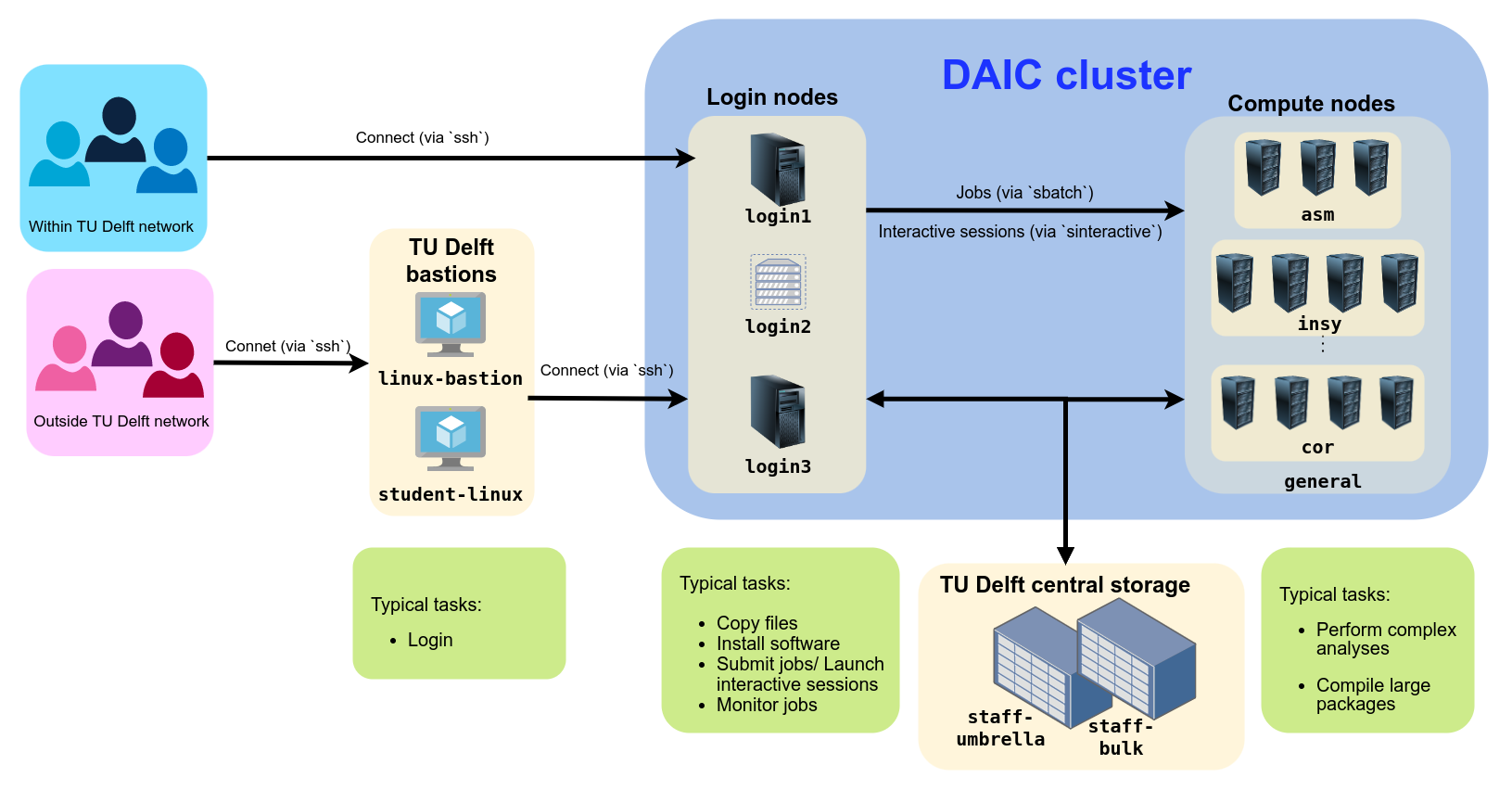
DAIC partitions and access/usage best practices



The Delft AI Cluster (DAIC)—formerly known as INSY-HPC or simply HPC—was initiated within the INSY department in 2015. In later phases, resources were merged with the ST department (collectively called CS@Delft) and expanded further with contributions from other departments across multiple faculties.
The cluster is available only to users from participating departments. Access is arranged through your department’s contact persons (see Access and accounts).
| I | Contributor | Faculty | Faculty abbreviation (English/Dutch) |
|---|---|---|---|
| 1 |  3D Geoinformation 3D Geoinformation | Faculty of Architecture and the Built Environment | ABE/BK |
| 2 | Architecture | ||
| 3 |  Aerospace Structures and Materials Aerospace Structures and Materials | Faculty of Aerospace Engineering | AE/LR |
| 4 | Control and Operations | ||
| 5 | Imaging Physics | Faculty of Applied Sciences | AS/TNW |
| 6 |  Cognitive Robotics Cognitive Robotics | Faculty of Mechanical Engineering | ME |
| 7 | Geoscience & Remote Sensing | Faculty of Civil Engineering and Geosciences | CEG/CiTG |
| 8 | Intelligent Systems | Faculty of Electrical Engineering, Mathematics & Computer Science | EEMCS/EWI |
| 9 | Software Technology | ||
| 10 | Signal Processing Systems, Microelectronics |
In addition to funding from contributing departments, DAIC has received support from the following projects and funding sources:






Immersive Technology Lab, part of Convergence AI

Since 2015, DAIC has facilitated more than 2,000 scientific outputs from participating departments:
| Article | Conference/Meeting contribution | Book/Book chapter/Book editing | Dissertation (TU Delft) | Abstract | Other | Editorial | Patent | Grand Total | |
|---|---|---|---|---|---|---|---|---|---|
| Grand Total | 1067 | 854 | 123 | 99 | 69 | 32 | 29 | 8 | 2281 |
These outputs span a wide range of research areas. Title analysis highlights frequent use of terms related to data analysis and machine learning:

Word cloud of the most common words in scientific output titles using DAIC
To help demonstrate the impact of DAIC, we ask that you both cite and acknowledge DAIC in your scientific publications.
Delft AI Cluster (DAIC). (2024). The Delft AI Cluster (DAIC), RRID:SCR_025091. https://doi.org/10.4233/rrid:scr_025091
@misc{DAIC,
  author = {{Delft AI Cluster (DAIC)}},
  title = {The Delft AI Cluster (DAIC), RRID:SCR_025091},
  year = {2024},
  doi = {10.4233/rrid:scr_025091},
  url = {https://daic.tudelft.nl/}
}
TY - DATA
T1 - The Delft AI Cluster (DAIC), RRID:SCR_025091
UR - https://doi.org/10.4233/rrid:scr_025091
PB - TU Delft
PY - 2024Research reported in this work was partially or completely facilitated by computational resources and support of the Delft AI Cluster (DAIC) at TU Delft (RRID: SCR_025091), but remains the sole responsibility of the authors, not the DAIC team.